Overview
Occasionally, you may encounter issues where email delivery is unsuccessful due to SMTP errors. This article provides information about the root causes and resolution for known SMTP queries when troubleshooting and reviewing log files.
Prerequisites
While reproducing the issue, gather the SMTP Debug logs:
-
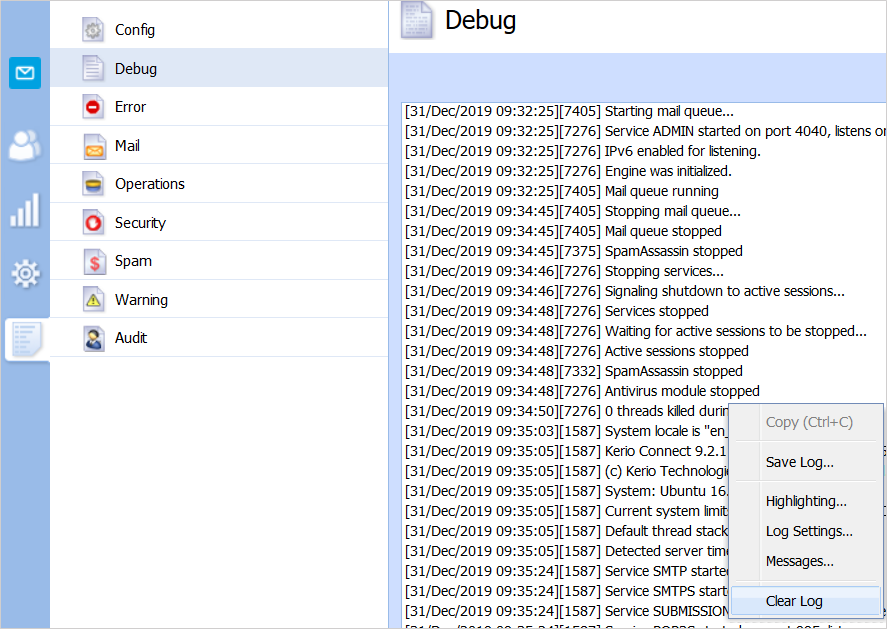
Log in to Kerio Connect Web Administration Console and go to Logs > Debug.
-
Clear the log by right-clicking on the logs area and selecting the Clear Log option from the context menu:
-
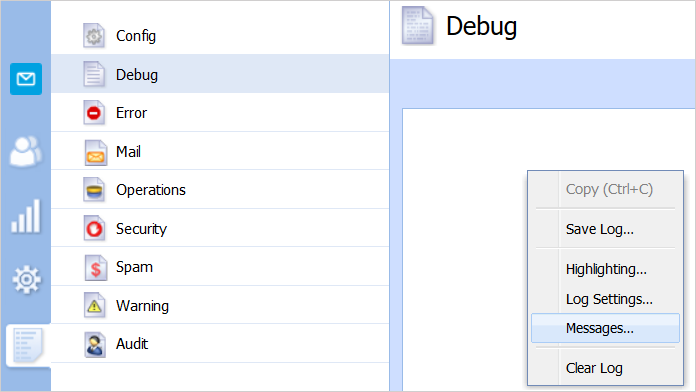
Enable the SMTP logs by right-clicking on any part of the log area and selecting the Messages option from the context menu:
-
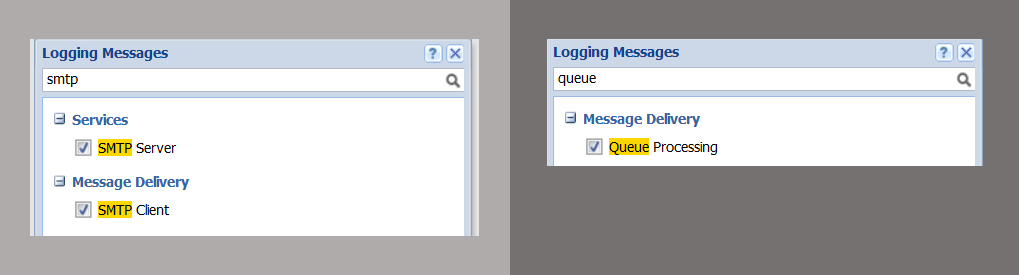
Ensure that the following checkboxes are selected and click the OK button:
-
SMTP server
-
SMTP client
-
Queue Processing
-
-
Reproduce the issue.
-
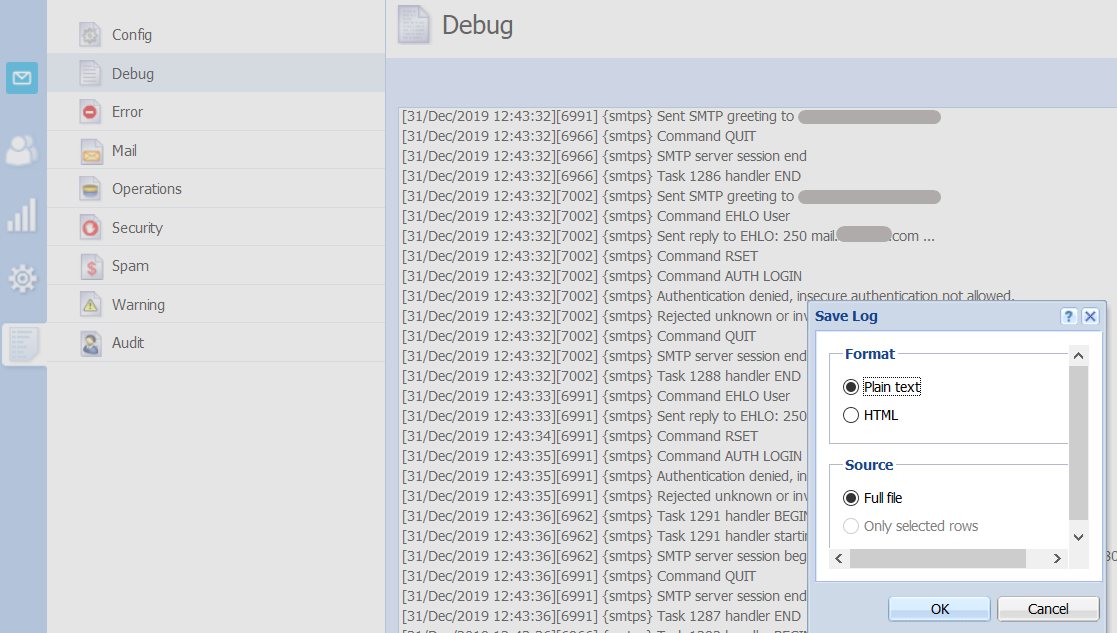
Gather the debug logs by right-clicking on the log area and selecting the Save Log option. Choose the Plain Text and Full File options:
-
(Optional) If possible, gather the source .eml file for additional information that can be used for further investigation.
Information
The following are scenarios involving SMTP-related issues, including their root causes and their fixes:
Scenario 1: Connection Lost |
|||||||||
|
The output of the debug logs shows a Connection Lost error response:
Sample output: [02/Jan/2019 13:03:13][4556] {smtpc} Sending email to SMTP server abc-de.mail.protection.outlook.com, delivering mail from <> [02/Jan/2019 13:03:13][4556] {smtpc} Connecting to server abc-de.mail.protection.outlook.com (xxx.xx.x.xx:25) using local interface 0.0.0.0 ... [02/Jan/2019 13:03:13][4556] {smtpc} Connected to SMTP server abc-de.mail.protection.outlook.com [02/Jan/2019 13:03:13][4556] {smtpc} Received greeting: 220 VE1EUR01FT033.mail.protection.outlook.com Microsoft ESMTP MAIL Service ready at Wed, 2 Jan 2019 12:03:13 +0000 [02/Jan/2019 13:03:13][4556] {smtpc} Sending EHLO [02/Jan/2019 13:03:13][4556] {smtpc} Switching connection to TLS [02/Jan/2019 13:03:13][4556] {smtpc} Sending EHLO [02/Jan/2019 13:03:13][4556] {smtpc} Sent MAIL command [02/Jan/2019 13:03:13][4556] {smtpc} Got reply: 250 2.1.0 Sender OK [02/Jan/2019 13:03:13][4556] {smtpc} Sent RCPT TO: <name@provider.com> [02/Jan/2019 13:03:13][4556] {smtpc} Got reply: 250 2.1.5 Recipient OK [02/Jan/2019 13:03:13][4556] {smtpc} Sent DATA command [02/Jan/2019 13:03:13][4556] {smtpc} Got reply: 354 Start mail input; end with <CRLF>.<CRLF> [02/Jan/2019 13:03:13][4556] {smtpc} Sending message body... [02/Jan/2019 13:03:32][4556] {smtpc} SMTP connection closed while reading SMTP reply [02/Jan/2019 13:03:32][4556] {smtpc} Connection lost with server akantal-sk.mail.protection.outlook.com: Connection lost Root Causes and Resolution
|
Scenario 2: Insufficient System Resources |
|||||
|
The output of the debug logs shows the following Insufficient Resources error response:
Sample output: [29/Jan/2019 09:53:20][3440] {smtpc} Sending EHLO [29/Jan/2019 09:53:20][3440] {smtpc} Sent MAIL command [29/Jan/2019 09:53:20][3440] {smtpc} Got reply: 250 2.1.0 Sender OK [29/Jan/2019 09:53:20][3440] {smtpc} Sent RCPT TO: <name@provider.com> [29/Jan/2019 09:53:20][3440] {smtpc} Got reply: 250 2.1.5 Recipient OK [29/Jan/2019 09:53:20][3440] {smtpc} Sent DATA command [29/Jan/2019 09:53:20][3440] {smtpc} Got reply: 354 Start mail input; end with <CRLF>.<CRLF> [29/Jan/2019 09:53:20][3440] {smtpc} Sending message body... [29/Jan/2019 09:53:20][3440] {smtpc} Data sent, got reply: 452 4.3.1 Insufficient system resources [29/Jan/2019 09:53:20][3440] {smtpc} Data not accepted: 452 4.3.1 Insufficient system resources [29/Jan/2019 09:53:21][3440] {smtpc} QUIT sent, got reply: 221 2.0.0 Service closing transmission channel
Root Cause and Resolution
|
Scenario 3: STARTTLS is Required to Send Mail |
||
|
The output of the debug logs shows a Non-Delivery Receipt (NDR) error response:
or
Sample output: Server at XX1XX9999XX9999.eurxxx04.prod.outlook.com returned '550 5.4.317 Message
expired, cannot connect to remote server(451 5.7.3 STARTTLS is required to send
mail)
2/24/2019 6:43:31 AM - Server at printcompany.dk (xxx.xxx.xxx.xxx) returned '450 4.4.317
  Cannot connect to remote server [Message=451 5.7.3 STARTTLS is required to send
  mail]
Root Cause and Resolution
STARTTLS is a low-level command that is used to check TLS encryption between two SMTP servers. The sending server requires the receiving server to support TLS, which can either be:
Opportunistic TLS (built-in Kerio Connect method) checks if the receiving server supports TLS. If the receiving server does not support TLS, opportunistic TLS will then agree to connect without TLS. Meanwhile, forced TLS will not establish a connection if the receiving server does not support TLS. This explains why some mail servers are unable to send emails. If the sending server uses forced TLS, you might notice that the message headers include this information: x-enforcedtls: 1. To resolve this issue, you need to purchase an SSL certificate from CA and install it in Kerio Connect. The following are SSL/TLS checker websites: |
Scenario 4: Invalid HELO Name |
|||||||
|
The output of the debug logs shows an NDR HELO error response:
Sample output: <name@provider.com> (xxxxx.xxxxx.domain.com: 550 Policy does not allow to use an Invalid HELO name.)"
The sending server does not use a Fully Qualified Domain Name (FQDN) in the SMTP HELO command (i.e., instead of sending a HELO command with <server_name>.example.com, it may send a HELO command that only includes the server_name).
Root Causes and Resolution
|
Scenario 5: Relay Access Denied |
|
The SMTP client debug output might be similar to the following: [04/Feb/2020 10:45:13][123145391128576] {smtpc} Connecting to server external_domain.dk (xxx.xxx.xxx.xxx:25) using local interface 0.0.0.0 ... [04/Feb/2020 10:45:13][123145391128576] {smtpc} Connected to SMTP server external_domain.dk [04/Feb/2020 10:45:13][123145391128576] {smtpc} Received greeting: 220 serverxxxx.servers.dk ESMTP Postfix [04/Feb/2020 10:45:13][123145391128576] {smtpc} Sending EHLO [04/Feb/2020 10:45:13][123145391128576] {smtpc} Switching connection to TLS [04/Feb/2020 10:45:13][123145391128576] {smtpc} Sending EHLO [04/Feb/2020 10:45:13][123145391128576] {smtpc} Sent MAIL command [04/Feb/2020 10:45:13][123145391128576] {smtpc} Got reply: 250 2.1.0 Ok [04/Feb/2020 10:45:13][123145391128576] {smtpc} Sent RCPT TO: <abc@external_domain.dk> [04/Feb/2020 10:45:13][123145391128576] {smtpc} Got reply: 454 4.7.1 <abc@external_domain.dk>: Relay access denied [04/Feb/2020 10:45:13][123145391128576] {smtpc} Recipient <abc@external_domain.dk> not accepted: 454 4.7.1 <abc@polyprint.dk>: Relay access denied [04/Feb/2020 10:45:13][123145391128576] {smtpc} No recipient succeeded [04/Feb/2020 10:45:13][123145391128576] {smtpc} QUIT sent, got reply: 221 2.0.0 Bye Root Causes and Resolution
You will see Error 454 in the email logs and bounce messages sent to users. This error usually happens when users send/forward emails to or receive emails from Postfix mail servers. There are two main reasons for this error:
It is recommended to check the SMTP Auth and Relay settings both on Kerio Connect's side and the third-party mail server's side. You need to check the following settings in Kerio Connect: |
Related Articles
Priyanka Bhotika
Comments