Overview
Kerio Connect users may encounter a Non-Delivery Report (NDR) containing the error "554 5.4.12 Hop count exceeded - possible mail loop" or "554 5.4.14 Hop count exceeded". This error means a mail server along the delivery path rejected the message because it passed through too many intermediate servers (hops).
The error can originate from two places:
- Your Kerio Connect server (when Kerio Connect is receiving or relaying the message) — resolved by adjusting Kerio Connect's hop limit or fixing local routing
- The recipient's mail server (when Kerio Connect is sending outbound mail) — resolved by the recipient's mail administrator
This article covers both scenarios. The first step is always to identify which server generated the error. This applies to all currently supported versions of GFI Kerio Connect.
In This Article
- Symptoms
- Diagnosing the Source of the Error
- When Kerio Connect Is Rejecting the Message
- When an External Server Is Rejecting the Message
- Additional Information
- FAQ
Symptoms
You or your users receive an NDR similar to the following:
The original message was received at Sun, 25 Aug 2019 16:01:26 -0400
from m012345.abcde.net [127.0.0.1]

----- The following addresses had permanent fatal errors -----
johndoe@domain.edu
(reason: 554 5.4.14 Hop count exceeded - possible mail loop ATTR34
 [BB1ACB12AA123.abc-def99.prod.protection.outlook.com])

----- Transcript of session follows -----
 ... while talking to domain-edu.mail.protection.outlook.com.:
 >>> DATA
 <<< 554 5.4.14 Hop count exceeded - possible mail loop
 554 5.0.0 Service unavailable
The issue may affect all inbound or outbound mail, or only messages to/from specific domains.
Diagnosing the Source of the Error
Before taking any action, determine which server rejected the message. The fix depends entirely on this.
Check the Reporting MTA
Look for the Reporting MTA (or Reporting-MTA) field in the NDR. This tells you which mail server generated the rejection.
- If it shows your Kerio Connect server's hostname or IP → the error is on your side. Go to When Kerio Connect Is Rejecting the Message.
- If it shows an external server you do not control (e.g.,
mx1.recipientdomain.com,*.mail.protection.outlook.com) → the error is on the recipient's side. Go to When an External Server Is Rejecting the Message.
Check the Session Transcript
The NDR may also include a Transcript of session section. The server name after "while talking to" is the one that issued the 554 rejection:
... while talking to mx1.recipientdomain.com:
>>> DATA
<<< 554 5.4.12 Hop count exceeded - possible mail loop
If the server listed is external, the problem is on the recipient's side.
When Kerio Connect Is Rejecting the Message
If the Reporting MTA is your own Kerio Connect server, the issue is typically caused by:
- Kerio Connect's maximum hop count being set too low
- Misconfigured port-forwarding rules in your firewall creating a routing loop
- Incorrect SMTP relay or routing configuration causing mail to bounce between servers
Prerequisites
Access to the Kerio Connect Administration console.
Option 1: Increase Hop Limit via Administration Console (Recommended)
- Log in to the Kerio Connect Administration console.
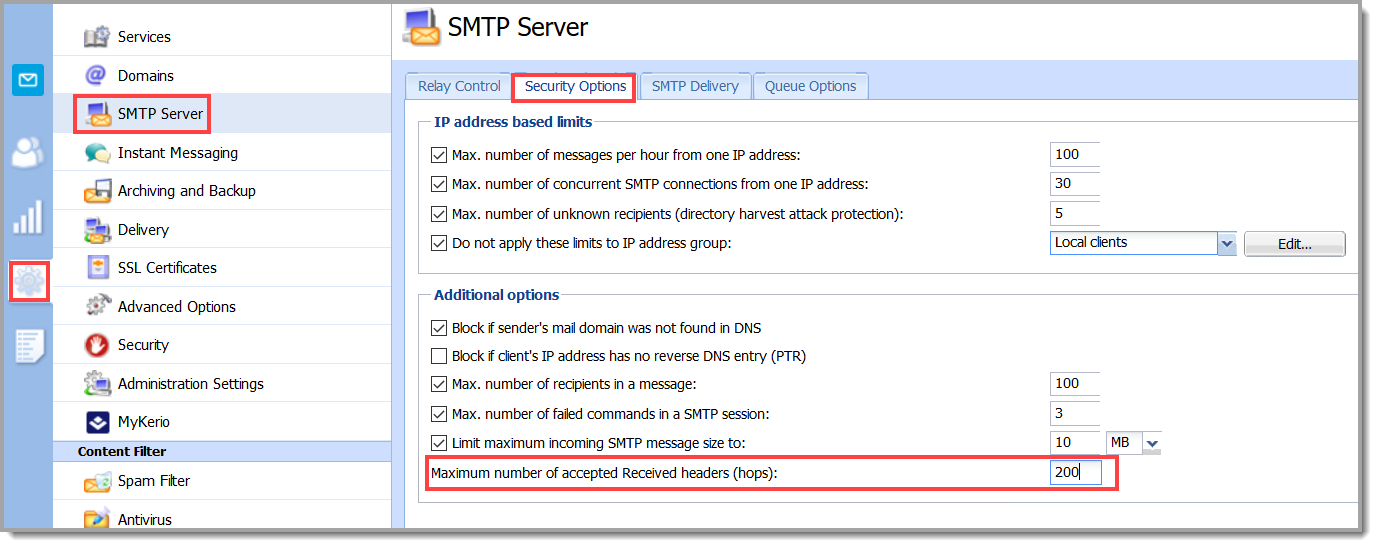
- Navigate to Configuration > SMTP Server > Security Options.
- Increase the Maximum number of accepted Received headers (hops) value.
- Click Apply.
Option 2: Increase Hop Limit via Configuration File
-
Stop the Kerio Connect service (Windows, macOS and Linux).
-
Navigate to the Kerio Connect installation folder:
- Windows:
C:\Program Files\Kerio\MailServer - macOS:
/usr/local/kerio/mailserver - Linux:
/opt/kerio/mailserver
- Windows:
-
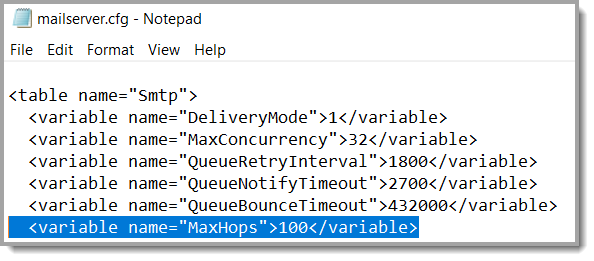
Open
mailserver.cfgand locate theMaxHopsvariable in theSMTPtable. Increase the value and save the file.
-
Start the Kerio Connect service.
Check for Routing Loops
If increasing the hop limit does not resolve the issue, the error may be caused by a genuine mail loop rather than a low hop limit. Review:
- Firewall port-forwarding rules — ensure inbound SMTP traffic is not being forwarded in a way that creates a loop back to Kerio Connect
- MX records — verify your domain's MX records point to the correct server
- SMTP relay settings — check that Kerio Connect is not configured to relay mail through a server that relays it back
When an External Server Is Rejecting the Message
If the Reporting MTA is an external server, your Kerio Connect server sent the message correctly and no changes are needed on your side. The rejection is happening within the recipient's mail infrastructure.
Common Causes on the Recipient's Side
- Mail routing loops — The recipient's MX records or internal routing rules send mail in circles between two or more servers
- Misconfigured gateways — An anti-spam or security gateway (e.g., Barracuda, Mimecast) forwards mail to the recipient's server, which forwards it back to the gateway
- Split-domain or hybrid routing errors — In environments where mail is split between on-premises and cloud servers, incorrect transport rules can create loops
- Overly strict hop limits — Some servers set a very low maximum hop count that legitimate mail exceeds in normal transit
What to Do
-
Gather the NDR details. Collect the full error code, Reporting MTA hostname, and session transcript from the bounce message.
-
Contact the affected recipient. Forward the NDR and let them know their mail server is rejecting your emails. You can use a message like this:
"Our mail server is delivering emails correctly to other recipients. Your mail server ([Reporting MTA hostname]) is rejecting our emails with a 'hop count exceeded' error (554 5.4.12), which indicates a routing loop or misconfiguration in your mail infrastructure. Please have your mail administrator review the mail routing configuration."
-
Suggest what the recipient's mail administrator should check:
- MX record configuration for circular routing
- Mail gateway forwarding rules (e.g., Barracuda, Mimecast, Exchange Online Protection)
- Internal transport rules and connectors
- Maximum hop count setting on their server (e.g., Postfix
hopcount_limit, ExchangeMaxHopCount)
Why This May Affect Only Some Recipients
This error is recipient-specific because it depends on each recipient's mail infrastructure. Recipients whose servers are properly configured will receive your emails without issue. The error only occurs when a particular recipient's mail routing causes the message to exceed the hop count limit before reaching its final destination.
Additional Information
How Mail Hops Work
Each time an email passes through a mail server, a Received header is added. The total number of Received headers is the "hop count." Most mail servers enforce a maximum hop count (commonly 25–100) to prevent infinite mail loops. When this limit is exceeded, the server rejects the message with a 554 5.4.x error.
Common Error Codes
- 554 5.4.12 — Hop count exceeded (general)
- 554 5.4.14 — Hop count exceeded (used by some Microsoft servers)
- 554 5.4.6 — Routing loop detected (Exchange / Exchange Online)
FAQ
Q1: How do I tell if the problem is on my side or the recipient's side?
A1: Check the Reporting MTA field in the NDR. If it shows your Kerio Connect server's hostname or IP, the issue is local. If it shows an external server, the issue is on the recipient's side.
Q2: I increased the hop limit on Kerio Connect, but some recipients still get bounce-backs. Why?
A2: If the Reporting MTA for those bounces is an external server, the rejection is happening on the recipient's side — not on yours. Increasing your own hop limit has no effect on rejections made by other servers. The recipient's mail administrator needs to investigate their routing configuration.
Q3: What hop count value should I set in Kerio Connect?
A3: The default is typically sufficient for most environments. If you need to increase it, a value of 50–100 is reasonable. Setting it extremely high is not recommended as it reduces protection against genuine mail loops.
Ciprian Nastase
Comments