Overview
When using the Kerio Outlook Connector Offline Edition (KOFF) with a Kerio Connect server that has multiple domain aliases configured, outgoing emails may intermittently remain in Outlook's Outbox and only get sent after Outlook (and the Kerio components) are force-closed and restarted. Triggering Send/Receive may show:
0x80048002 - This task was cancelled before it was completed.
The behavior is caused by Kerio Connect 10.x advertising every alias domain to KOFF, which makes Outlook create a separate Send/Receive task per domain and overload its task queue. A permanent server-side fix is now available that restores the pre-10.x behavior; until it is deployed, a client-side Send/Receive workaround relieves the symptom immediately.
In This Article
- Cause
- Permanent fix (server-side)
- Interim workaround (client-side)
- Recovering an already-affected workstation
- FAQ
Cause
The multiple tasks you see in Outlook are due to how the MAPI (Messaging Application Programming Interface) service handles different email sender addresses:
- For each FROM address (email alias), Outlook creates a separate transport provider in the KOFF MAPI service.
- Each transport provider has both send and receive capabilities.
- This results in Outlook showing multiple Send/Receive tasks per transport provider, and the task ordering is handled internally by Outlook with no option to control it.
On Kerio Connect 10.x, domain-alias addresses were included in the list of addresses advertised to KOFF, so each alias domain produced its own transport provider. With one primary domain plus several alias domains, every user ends up with many providers and many simultaneous Send/Receive tasks, which overloads the queue and leaves messages stuck in the Outbox. Under sustained load this pressure can also destabilize the local KOFF offline store. This did not occur in 9.x, where only the primary domain was used.
Permanent fix (server-side)
A Kerio Connect server-side fix excludes domain-alias addresses from the list of addresses KOFF registers, restoring the pre-10.x behavior:
- Domain-alias addresses no longer create additional MAPI transport providers in Outlook.
- Only the primary domain and any user-level mail aliases are registered.
- Outgoing mail shows the primary domain address.
Because the change is on the server, no per-workstation reconfiguration is required once the server is updated. The fix is delivered as an updated Kerio Connect server build, available here:
Fixed build (Google Drive): https://drive.google.com/drive/u/0/folders/11AZ3b0YW-lkTj-vOWIq9zoIkq2gbZQ5B
Download the build for your server's operating system, then apply it using your standard Kerio Connect upgrade procedure. If a package for your platform is not present in the folder, contact GFI Kerio Connect Support so the correct build can be provided.
Interim workaround (client-side)
Until the server-side fix is deployed, reduce the Send/Receive task overload on affected workstations by limiting the Send/Receive group so only the primary account runs under normal operation:
-
Modify Send/Receive Group Settings:
- Open Outlook and navigate to File → Options → Advanced → Send/Receive.
- Edit the "All Accounts" group.
- Enable "Include the selected account in this group" only for your primary account.
- Disable this option for secondary/alias accounts.
-
Expected Outcome:
- Only one task will be created when using "Send/Receive All".
- When sending from an alias, only the specific account will be used.
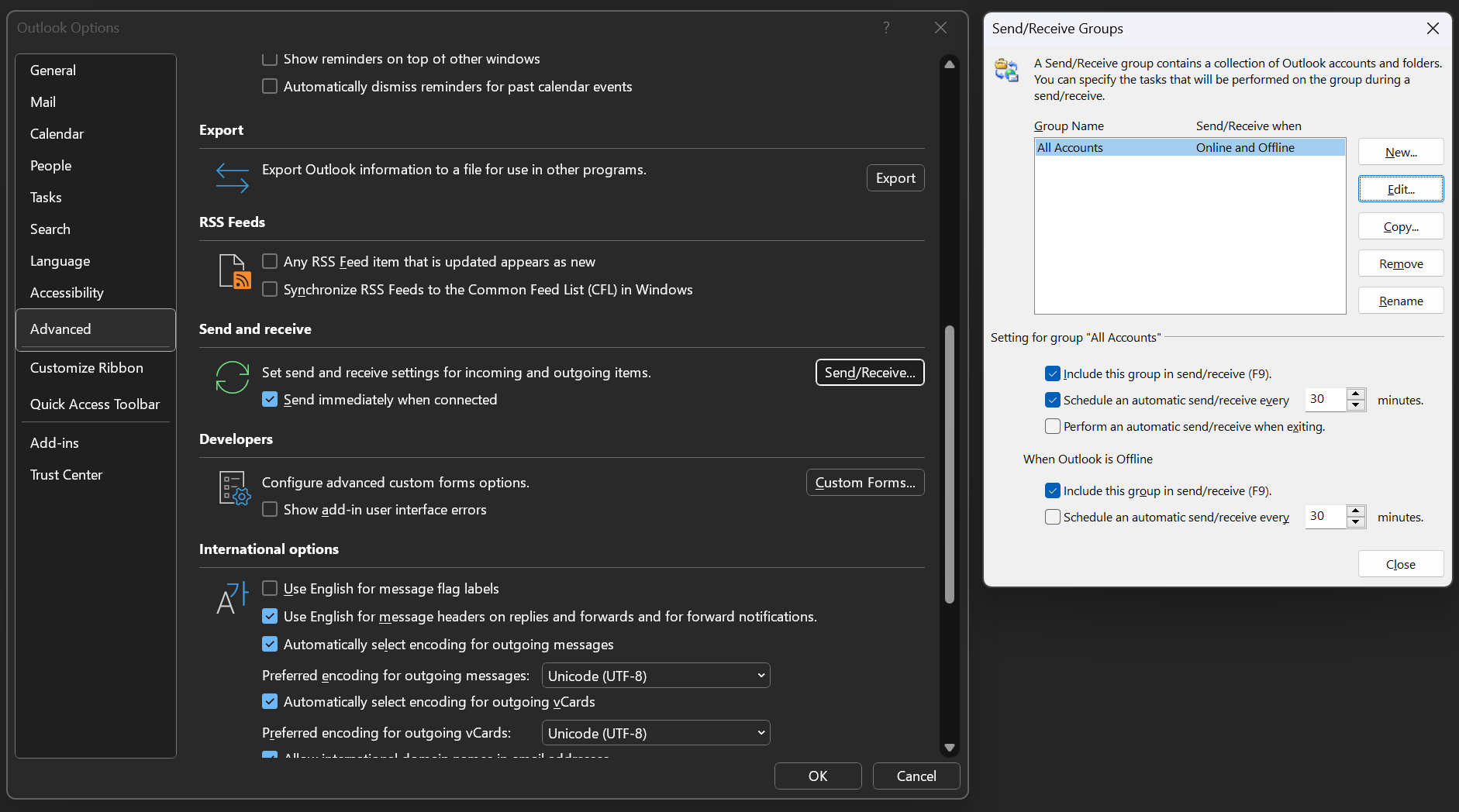
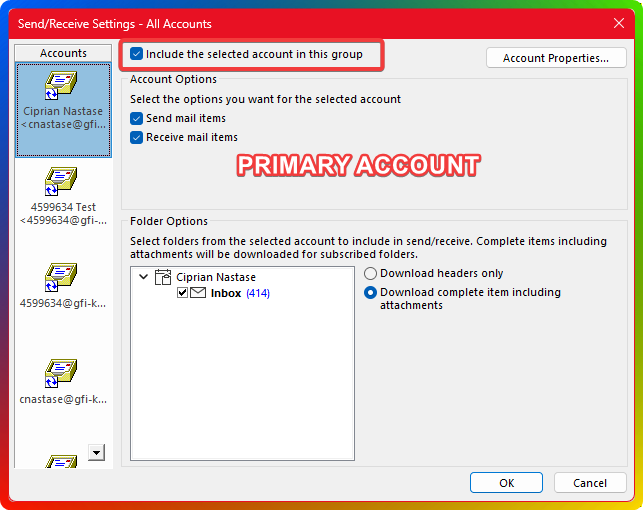
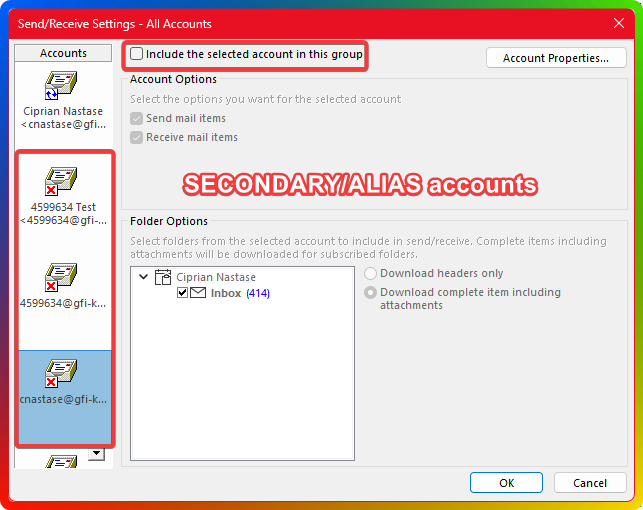
Important Note: The Send/Receive groups are stored in .SRS files used internally by Outlook. Microsoft does not provide documentation for these files, so manual adjustments are limited to the above steps.
Recovering an already-affected workstation
If a workstation's local KOFF store has already become inconsistent (messages remain stuck even after the workaround), rebuild the KOFF offline cache. This removes only the local offline copy and forces a resync from the server; it does not delete mailbox data on the server. See Rebuilding KOFF Profile on Windows (Control Panel → Mail → KOFF → Email Accounts → Change → Maintenance tab → Empty), then restart Outlook and let the mailbox resync. To automate this across many workstations, see Manually Clearing Outlook KOFF Cache on Client PC.
FAQ
1. How do I know if this issue applies to my situation?
If you are using Kerio Outlook Connector (KOFF) with multiple domains configured as aliases and are experiencing emails stuck in the Outbox (often with 0x80048002), this issue may apply to you. Affected users typically show multiple simultaneous Send/Receive tasks in Outlook.
2. Do I have to change settings on every workstation to fix this permanently?
No. The permanent fix is applied on the Kerio Connect server, so once the updated server build is in place no per-workstation reconfiguration is required. The Send/Receive group adjustment is only an interim workaround for use before the server is updated.
3. Will my alias domains still work after the fix?
Yes. After the fix, domain-alias addresses no longer create separate Outlook transport providers; outgoing mail shows the primary domain address, and primary-domain sending and user-level mail aliases continue to work. If your mail flow depends on sending visibly from specific domain aliases through Outlook/KOFF, discuss your routing requirements with Support before changing your domain design.
Ciprian Nastase
Comments